

| Price | RM10.00 |
| Product SKU | 1350140757-1597722590057-0 |
| Size (L x W x H) | 10 cm x 10 cm x 10 cm |
| Availability | In Stock |
| Shipping Fee |
Malaysia
Free for certain area only
|
| Quantity |
|


Suitable for Astro UHD box and split to 4k and 1080p video at the same time.
Features
- Simultaneously displays an UItra Hi-Def source on up to four UItra HD displays.
- Supports resolutions up to UItra HD 4Kx2K (3840x2160@60Hz YUV 4:4:4 ).
- Supports three kinds of EDID handling abilities.
- Supports HDCP2.2/1.4 Compliant.
- Supports 36 bit Deep Color.
- Supports LPCM 7.1, Dolby TrueHD, Dolby digital Plus, and DTS-HD Master Audio .
- Support 3D/
- Bandwidth 18G.
- Support HDR.
- Support online firmware upgrade via Micro USB Port.
Specifications
|
Operating Temperature Range |
-5 to +40℃(+23 to +104℉) |
|
Operating Humidity Range |
5 to 90%RH (No Condensation) |
|
Bandwidth frequency |
18Gbps |
|
HDCP |
HDCP2.2 |
|
Input ports |
1xHDMI(female) |
|
Output ports |
4xHDMI outputs(female) |
|
Resolution outputs |
up to 4Kx2K(3840x2160@60Hz YUV 4:4:4) |
|
Dimensions(LxWxH) |
150x64.2x17mm |
|
Power consumption |
2W(MAX) |
|
Transmission Distance |
15m(Maximum)over standard HDMI cable/26AWG |
|
Net Weight |
245g |
Panel Description

- Indicator of HDMI input
- Indicator of HDMI output
- Indicator of Power input
- Switch to “Mixed EDID” mode
- Switch to “Auto EDID” mode
- Switch to “Copy EDID” mode
- Firmware port
- Power input
- HDMI output ports
- HDMI input port
EDID Introduction:
Copy EDID: output 4 is prior port
When output 4 is connected to one display, another display which connected to output 1/2/3 will follow the Resolution of output 4.
Auto: Default 4K@60Hz.
Mixed EDID: always follow the lowest resolution of the displays connected to 4 outputs in order to support all displays show the source.
NOTE : The HDCP Version is prior to EDID, when the source is HDCP2.2, if the TV supports HDCP2.2, it will output 4K@60Hz, if the TV doesn’t support HDCP2.2, it will output 1080p.
Please see below table :
|
Input source |
HDMI display Support HDCP2.2 |
HDMI display Doesn’t support HDCP2.2 |
|
HDCP2.2 4K@60Hz |
HDCP2.2 4K@60Hz |
HDCP1.4 1080p@60Hz |
|
HDCP2.2 4K@24Hz |
HDCP2.2 4K@24Hz |
HDCP1.4 1080p@24Hz |
|
HDCP1.4 4K@24Hz |
HDCP1.4 4K@24Hz |
HDCP1.4 4K@24Hz |
Support HDR under copy EDID and Mixed EDID mode
Connecting and operating
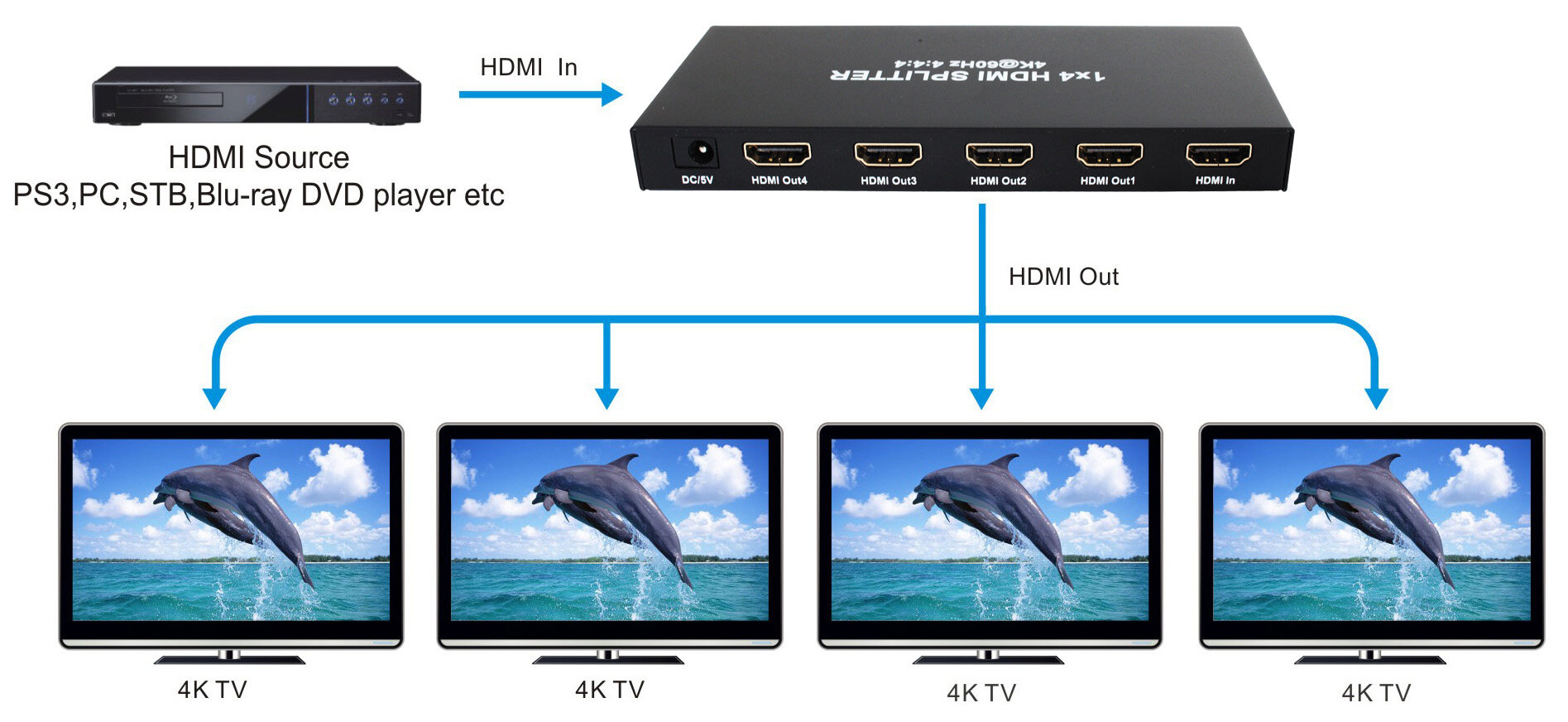
- Connect the HDMI input source to input port of HDMI splitter.
- Connect the HDMI splitter output ports to the displays.
- Power up splitter, source and displays.
Connection Diagram

Suitable for Astro UHD box and split to 4k and 1080p video at the same time.FeaturesSimultaneously displays an UItra Hi-Def source on up to four UItra HD displays.Supports resolutions up to UItra HD 4Kx2K (3840x2160@60Hz YUV 4:4:4 ).Supports three kinds of EDID handling abilities.Supports HDCP2.2/1.4 Compliant.Supports 36 bit Deep Color.Supports LPCM 7.1, Dolby TrueHD, Dolby digital Plus, and DTS-HD Master Audio .Support 3D/Bandwidth 18G.Support HDR.Support online firmware upgrade via Micro USB Port.Specifications
Panel Description
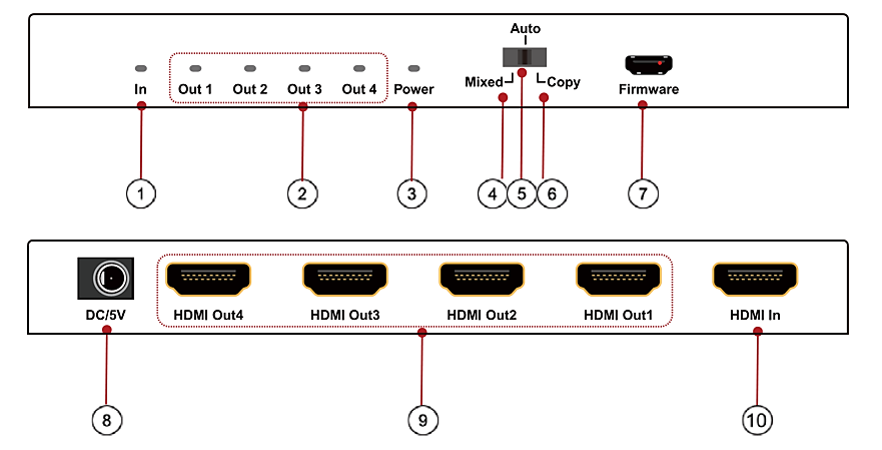
Indicator of HDMI inputIndicator of HDMI outputIndicator of Power inputSwitch to “Mixed EDID” modeSwitch to “Auto EDID” modeSwitch to “Copy EDID” modeFirmware portPower inputHDMI output portsHDMI input portEDID Introduction:Copy EDID: output 4 is prior portWhen output 4 is connected to one display, another display which connected to output 1/2/3 will follow the Resolution of output 4.Auto: Default 4K@60Hz.Mixed EDID: always follow the lowest resolution of the displays connected to 4 outputs in order to support all displays show the source.NOTE : The HDCP Version is prior to EDID, when the source is HDCP2.2, if the TV supports HDCP2.2, it will output 4K@60Hz, if the TV doesn’t support HDCP2.2, it will output 1080p.Please see below table :
Support HDR under copy EDID and Mixed EDID modeConnecting and operatingConnect the HDMI input source to input port of HDMI splitter.Connect the HDMI splitter output ports to the displays.Power up splitter, source and displays.Connection Diagram